
Produs
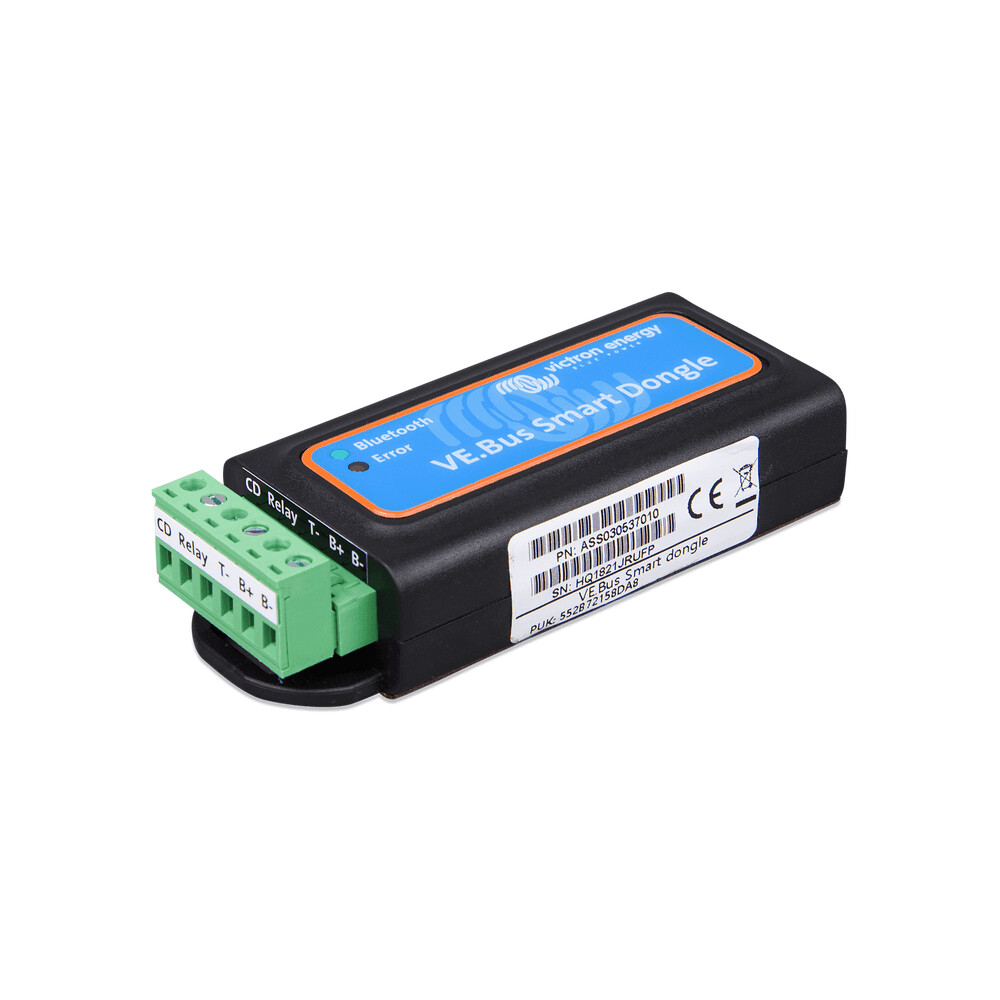
Victron VE.Bus Smart dongle for Inverters with VE.Bus for Read out and Control, Car Parts
$54.70
Car Accessories
The Victron VE.Bus Smart Dongle For Instant Read out and Control The VE.Bus Smart dongle is two products in one:Bluetooth accessory for our range of inverter/chargers:, and our series of Phoenix Inverters with a VE.Bus port. When installed, use the VictronConnect App to monitor operation and also operate the system: change the input current limit as well as switch between Off, On and Charger-only modes.it can work as a Voltage- and Temperature-sense device for the inverter/charger. This works with all models.For monitoring, the device is a great alternative in caravans, smaller yachts and motor homes for which the Color Control GX or Venus GX and Cerbo are a step too far. It also adds Instant Readout to the VE.Bus product and displays the inverter/charger's key data on the VictronConnect device list page without requiring a connection to the product. This includes visual notifications of warnings, alarms, and errors, allowing for at-a-glance diagnostics. Compatible With Multis MultiPlusses MultiPlus-II MultiGrid MultiGrid-II Quattros Phoenix Inverters with VE.Bus Port
More information
More information
Table of Contents
- Why it matters
- Features & benefits
- Key specifications
- Usage & maintenance
- Frequently Asked Questions
Why it matters
The Victron VE.Bus Smart Dongle is an essential accessory for users of Victron inverter/chargers. It enhances the functionality of your inverter system by providing instant readouts and control capabilities through a Bluetooth connection. This is particularly beneficial for those who operate caravans, smaller yachts, or motor homes, where more complex systems like the Color Control GX or Venus GX may not be necessary.
Quick overview
- Bluetooth accessory for Victron inverter/chargers.
- Instant readout of key data.
- Compatible with various Victron models.
- Easy monitoring via the VictronConnect App.
Features & benefits
The Victron VE.Bus Smart Dongle offers a range of features that enhance the user experience:
- Bluetooth Connectivity: Easily connect to your inverter/charger using the VictronConnect App.
- Instant Readout: Get real-time data on your inverter/charger’s performance without needing a direct connection.
- Control Options: Change input current limits and switch between Off, On, and Charger-only modes.
- Voltage and Temperature Sensing: Monitor the voltage and temperature of your inverter/charger for optimal performance.
- Visual Notifications: Receive alerts for warnings, alarms, and errors for quick diagnostics.
Useful details
This dongle is compatible with a variety of Victron products, including:
- Multis
- MultiPlusses
- MultiPlus-II
- MultiGrid
- MultiGrid-II
- Quattros
- Phoenix Inverters with VE.Bus Port
Key specifications
While specific technical specifications are not provided, the Victron VE.Bus Smart Dongle is designed to work seamlessly with the aforementioned Victron products, enhancing their functionality.
Usage & maintenance
To make the most of your Victron VE.Bus Smart Dongle, follow these practical tips:
- Installation: Ensure the dongle is correctly installed to your inverter/charger for optimal performance.
- App Usage: Download the VictronConnect App to access all features and functionalities.
- Regular Monitoring: Check the app regularly for updates on performance and any alerts.
- Battery Maintenance: Keep an eye on voltage and temperature readings to maintain battery health.
Frequently Asked Questions
Here are some common questions regarding the Victron VE.Bus Smart Dongle:
- What devices are compatible with the Victron VE.Bus Smart Dongle?
It is compatible with Multis, MultiPlusses, MultiPlus-II, MultiGrid, MultiGrid-II, Quattros, and Phoenix Inverters with VE.Bus Port. - How do I connect the dongle to my inverter?
Simply install the dongle to your inverter/charger and use the VictronConnect App for Bluetooth connectivity. - Can I monitor my inverter without a direct connection?
Yes, the dongle allows for instant readouts without needing a direct connection. - What kind of notifications can I expect?
You will receive visual notifications for warnings, alarms, and errors. - Is there a specific app I need to use?
Yes, the VictronConnect App is required for monitoring and controlling the system.
Related products
-

Eberspacher Water Heater Header Tank Plastic 2 Outlet 5 Litre | 17742 | 292100017742, Car Accessories
$99.95 See the product in the store Quick View -

Eberspacher Espar or Webasto Exhaust Condensate Drain Pipe 6mm with union | 5687 | 292199005687, Car Accessories
$29.35 See the product in the store Quick View -

Eberspacher Hydronic D5WSC Water Heater 12V Replacement Unit | 252219050000, Car Accessories
$998.95 See the product in the store Quick View -
Eberspacher or Webasto 30mm exhaust marine hull fitting | 221050894300, Car Accessories
$208.54 See the product in the store Quick View
Reviews
There are no reviews yet.