
Produs
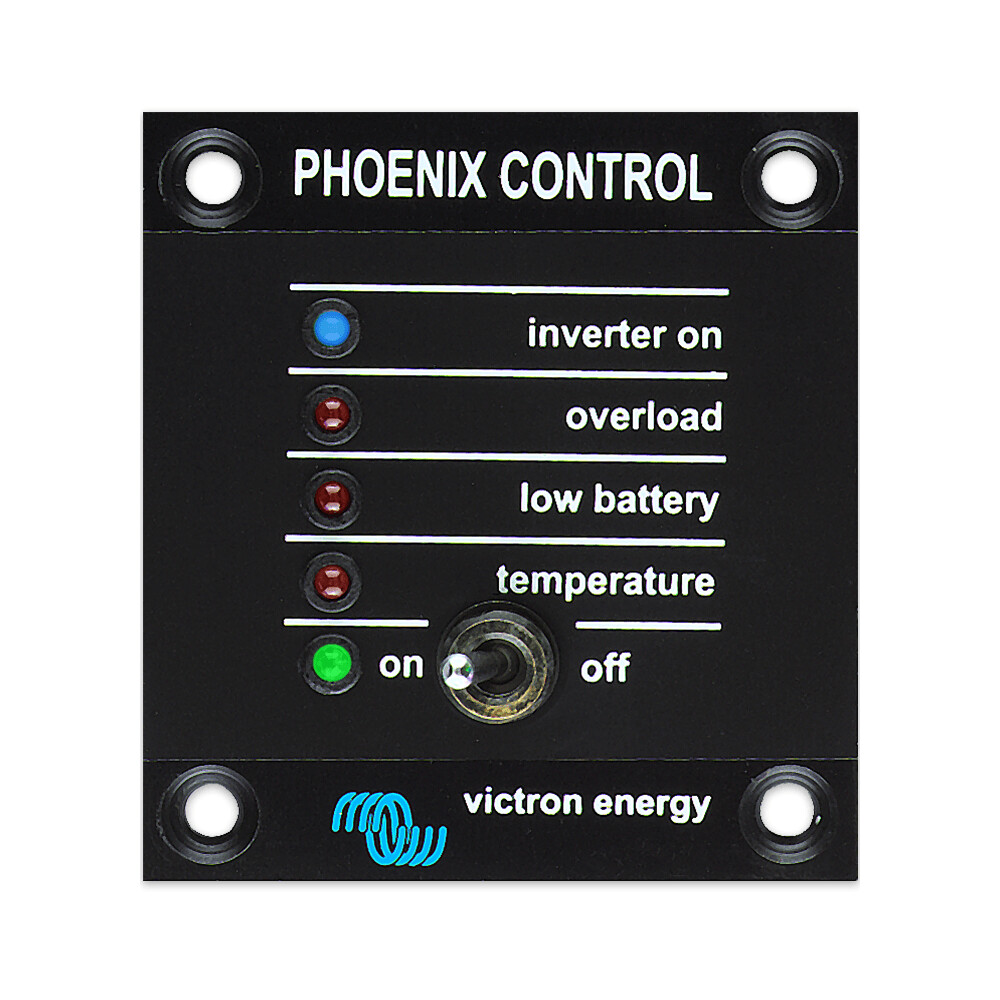
Victron Energy Phoenix Inverter Control, Car Parts
$94.79
Car Accessories
Victron Energy Phoenix Inverter Control This panel is intended for Phoenix Inverters equipped with a UTP remote monitoring and control socket. It can also be used on a MultiPlus Inverter/Charger when an automatic transfer switch but no charger function is desired. The brightness of the LEDs is automatically reduced during night time. Only for models: 12/1200, 12/1600, 12/2000, 12/3000, 12/5000, 24/1200, 24/1600, 24/2000, 24/3000, 24/5000, 48/3000 and 48/5000.
More information
More Information
Table of Contents
- Why it Matters
- Features & Benefits
- Key Specifications
- Usage & Maintenance
- Frequently Asked Questions
Why it Matters
The Victron Energy Phoenix Inverter Control is an essential accessory for users of Phoenix Inverters. This control panel enhances the functionality of your inverter, allowing for remote monitoring and control. It is particularly beneficial for those who rely on their inverters for power in off-grid situations or during emergencies.
Quick Overview
- Compatible with various models of Phoenix Inverters.
- Allows for remote monitoring and control.
- LED brightness adjusts automatically for night use.
Features & Benefits
Useful Details
- **Remote Monitoring**: The control panel connects to the inverter via a UTP socket, enabling users to monitor performance from a distance.
- **Automatic LED Brightness**: The panel's LEDs automatically dim at night, reducing light pollution and conserving energy.
- **Versatile Compatibility**: It works with a range of models, including 12V and 24V systems, making it a flexible choice for various setups.
- **User-Friendly Interface**: The design is intuitive, allowing users to easily navigate settings and monitor inverter performance.
- **Enhanced Control**: Ideal for MultiPlus Inverter/Charger setups where an automatic transfer switch is needed without the charger function.
Key Specifications
While specific technical specifications are not provided, the control panel is designed for the following models:
- 12/1200
- 12/1600
- 12/2000
- 12/3000
- 12/5000
- 24/1200
- 24/1600
- 24/2000
- 24/3000
- 24/5000
- 48/3000
- 48/5000
Usage & Maintenance
To ensure optimal performance of the Victron Energy Phoenix Inverter Control, consider the following tips:
- **Installation**: Follow the manufacturer's guidelines for installation to ensure compatibility and functionality.
- **Regular Monitoring**: Check the inverter's performance regularly through the control panel to catch any issues early.
- **Keep Clean**: Ensure that the control panel is kept clean and free from dust to maintain visibility and functionality.
- **Update Firmware**: If applicable, keep the firmware updated to benefit from the latest features and improvements.
Frequently Asked Questions
1. What models are compatible with the Victron Energy Phoenix Inverter Control?
The control panel is compatible with various models, including 12V, 24V, and 48V Phoenix Inverters.
2. Can I use this control panel with a MultiPlus Inverter/Charger?
Yes, it can be used with a MultiPlus Inverter/Charger when an automatic transfer switch is needed without the charger function.
3. How does the automatic LED brightness feature work?
The LEDs on the control panel automatically reduce brightness during nighttime to minimize light pollution.
4. Is installation straightforward?
Installation is designed to be user-friendly, but it is recommended to follow the manufacturer's guidelines for best results.
5. What maintenance is required for the control panel?
Regular monitoring, cleaning, and firmware updates (if applicable) are recommended to ensure optimal performance.
Related products
-
Webasto Marine heater exhaust hull skin fitting 24mm | 9018377A, Car Accessories
$0.00 See the product in the store Quick View -

Eberspacher Espar or Webasto Exhaust Condensate Drain Pipe 6mm with union | 5687 | 292199005687, Car Accessories
$29.35 See the product in the store Quick View -

Webasto Air Top 2000 STC 12v Single Outlet Marine kit, Car Accessories
$1,415.95 See the product in the store Quick View -
Eberspacher or Webasto exhaust elbow 24mm with condensate connection | 251226894500, Car Accessories
$77.51 See the product in the store Quick View
Reviews
There are no reviews yet.