
Produs
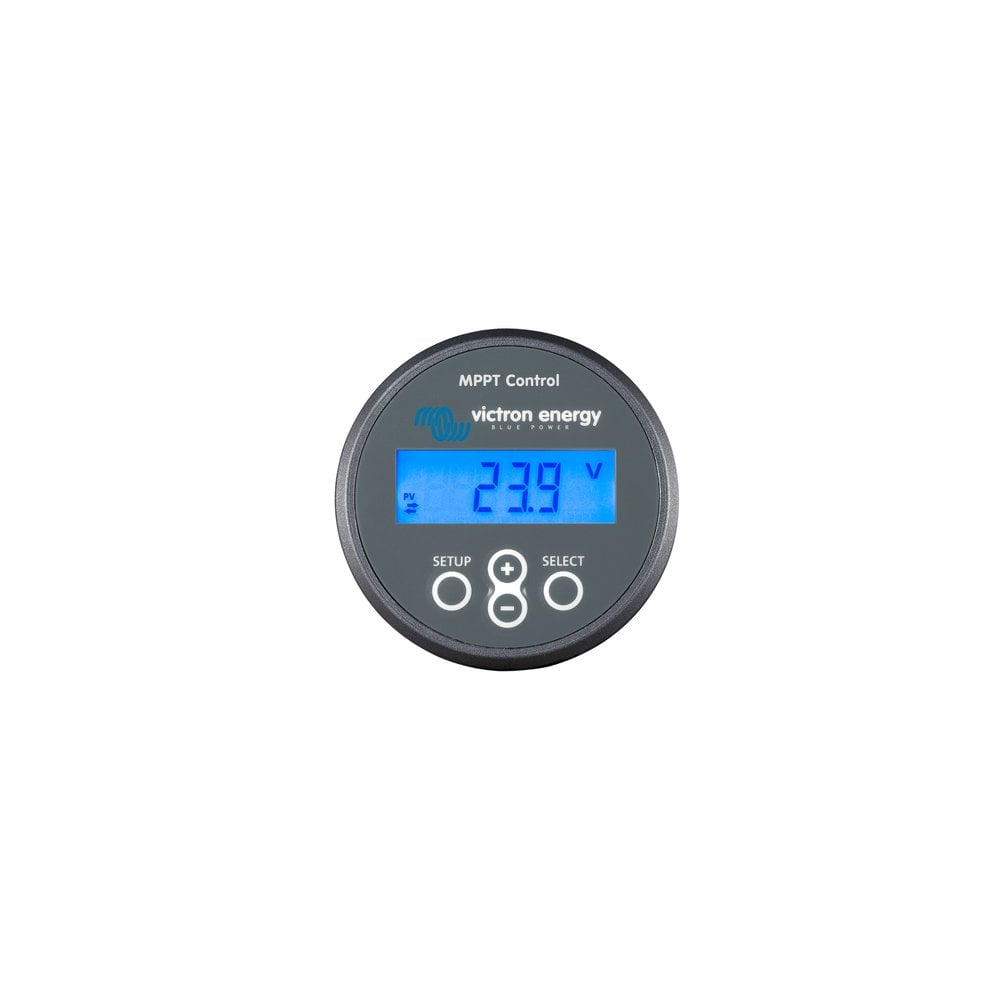
Victron MPPT Control for SmartSolar and BlueSolar| SCC900500000, Car Parts
$70.74
Car Accessories
Victron Energy MPPT Control for SmartSolar and BlueSolar The MPPT Control lets you see the status as well as setup all BlueSolar MPPT Charge Controllers that have a VE.Direct communications port. The MPPT Control is mounted in the familiar BMV-700 series housing, maintaining a consistent and professional look to your panels and systems monitoring equipment. View live status information, including solar watts, battery voltage, charge current, load current and more. View historical information All-time values 30-day historical values MPPT setup
More information
More Information
Table of Contents
- Why it matters
- Features & benefits
- Key specifications
- Usage & maintenance
- Frequently Asked Questions
Why it matters
The Victron MPPT Control is an essential tool for anyone utilizing solar energy systems. It provides real-time monitoring and control of your solar charge controllers, ensuring optimal performance and efficiency. Understanding the status of your solar system can help you make informed decisions about energy usage and maintenance.
Quick overview
- Compatible with BlueSolar and SmartSolar MPPT Charge Controllers.
- Displays live data including solar watts, battery voltage, and charge current.
- Historical data tracking for better energy management.
Features & benefits
The Victron MPPT Control offers a range of features that enhance the usability and functionality of your solar energy system:
Useful details
- Live Status Monitoring: View real-time data on solar watts, battery voltage, charge current, and load current.
- Historical Data: Access all-time values and 30-day historical data to track performance over time.
- Easy Setup: Simple configuration for all BlueSolar MPPT Charge Controllers with VE.Direct communications port.
- Professional Appearance: Designed to match the BMV-700 series housing for a cohesive look.
Key specifications
While specific technical specifications are not provided, the Victron MPPT Control is designed to work seamlessly with the BlueSolar and SmartSolar MPPT Charge Controllers. It features a user-friendly interface that allows for easy navigation and monitoring.
Usage & maintenance
To ensure optimal performance of the Victron MPPT Control, consider the following practical tips:
Practical tips
- Regularly check the live status information to monitor system performance.
- Utilize the historical data feature to identify trends and make adjustments as needed.
- Keep the device clean and free from dust to maintain optimal functionality.
Frequently Asked Questions
Here are some common questions regarding the Victron MPPT Control:
- What is the purpose of the Victron MPPT Control?
It allows users to monitor and configure BlueSolar MPPT Charge Controllers. - Can I use it with other brands of charge controllers?
Not specified. - How do I set it up?
Follow the user manual for configuration instructions. - Is historical data available?
Yes, it provides all-time values and 30-day historical data. - What does VE.Direct communications port mean?
It is a communication interface used by Victron devices for data exchange.
Pros and Cons
Pros
- Real-time monitoring capabilities.
- Historical data tracking for performance analysis.
- Easy setup and user-friendly interface.
- Professional design that matches existing Victron products.
Cons
- Not specified if compatible with other brands.
- Requires VE.Direct communication for full functionality.
Related products
-
Eberspacher or Webasto 30mm exhaust marine hull fitting | 221050894300, Car Accessories
$208.54 See the product in the store Quick View -

Webasto 7 Day Marine Timer Programmer Thermo Top 12v Heater | 4110551A, Car Accessories
$118.54 See the product in the store Quick View -

Webasto Heater Marine Exhaust Hull Fitting 38mm | 9018378A | 1320983A | 447633, Car Accessories
$200.70 See the product in the store Quick View -

Webasto Air Top 2000 STC 12v Single Outlet Marine kit, Car Accessories
$1,415.95 See the product in the store Quick View
Reviews
There are no reviews yet.